ZGHEX / HELP
Inspect ZIP archives
Read the central directory and look for nested archives.
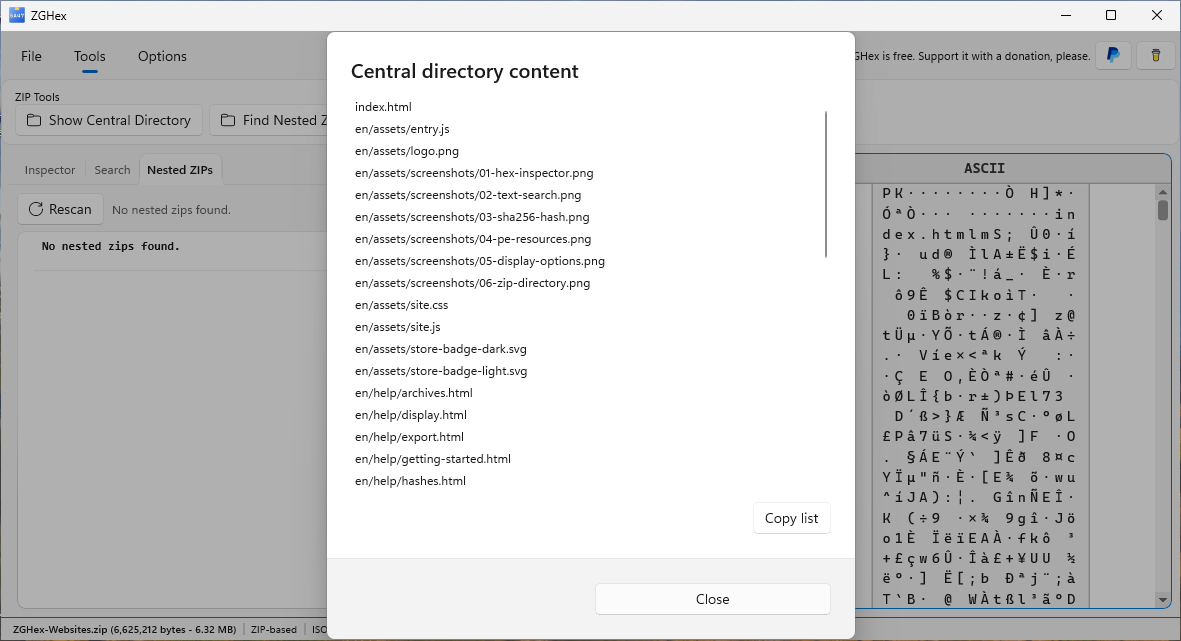
Read the central directory
- Open a ZIP file recognized by ZGHex.
- Select Tools → ZIP Tools → Show Central Directory.
- Read the names of the entries listed in the dialog, without extracting their contents.
File → Find file signature selects the central-directory bytes for a supported ZIP. For other recognized formats, that command selects the detected signature.
Look for nested ZIPs
Choose Find Nested Zips under ZIP Tools. Results appear in the Nested ZIPs tab. Select an entry to locate its bytes in the main view; use the refresh control to repeat the scan.
Detection is based on entry names and recognizable ZIP payloads. Results are candidates for inspection, not a guarantee that every embedded archive will be found or can be opened.
Format limits
The central-directory reader does not support ZIP64 directory offsets and sizes. Damaged or unsupported archives may have no readable directory. ZGHex is an inspection tool: these commands do not extract files.