ZGHEX / HELP
Calculate a file hash
Generate and copy a fingerprint of the whole file.
Calculate and copy
- Open the file, then select Tools.
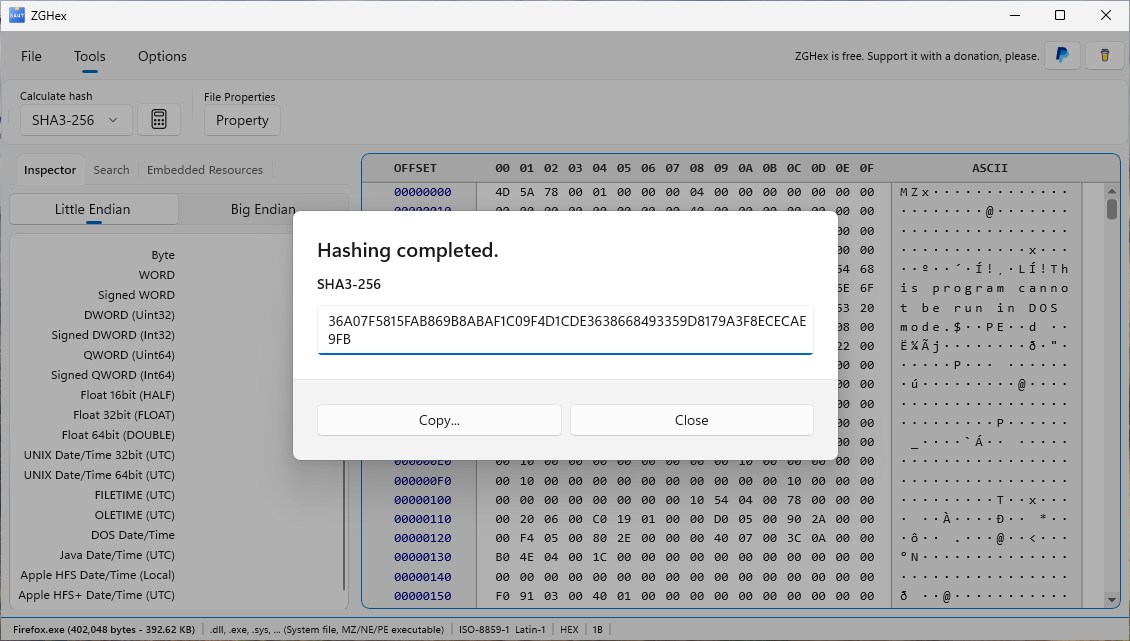
- Under Calculate hash, choose an algorithm, for example SHA-256.
- Click the calculate button next to the algorithm list.
- Wait for completion and choose Copy in the result dialog.
The hash covers the entire file, even when bytes are selected. You can cancel the operation from the progress dialog.
Compare results
Compare the copied result with a reference calculated using the same algorithm. A different hash indicates different file contents. ZGHex provides the value to copy; perform the comparison yourself.
Available algorithms
MD5, SHA-1, SHA-256/384/512, SHA3-256/384/512, RIPEMD-160/256/320, Tiger and Whirlpool. Choose the algorithm required by your reference.
Next guideExplore PE resources →