ZGHEX / HELP
Your first file
Install ZGHex, open a file and get your bearings.
Install and open
- Use Get ZGHex — free to download the installer from Microsoft, then run it on Windows to install the app.
- Start ZGHex and choose File → Open....
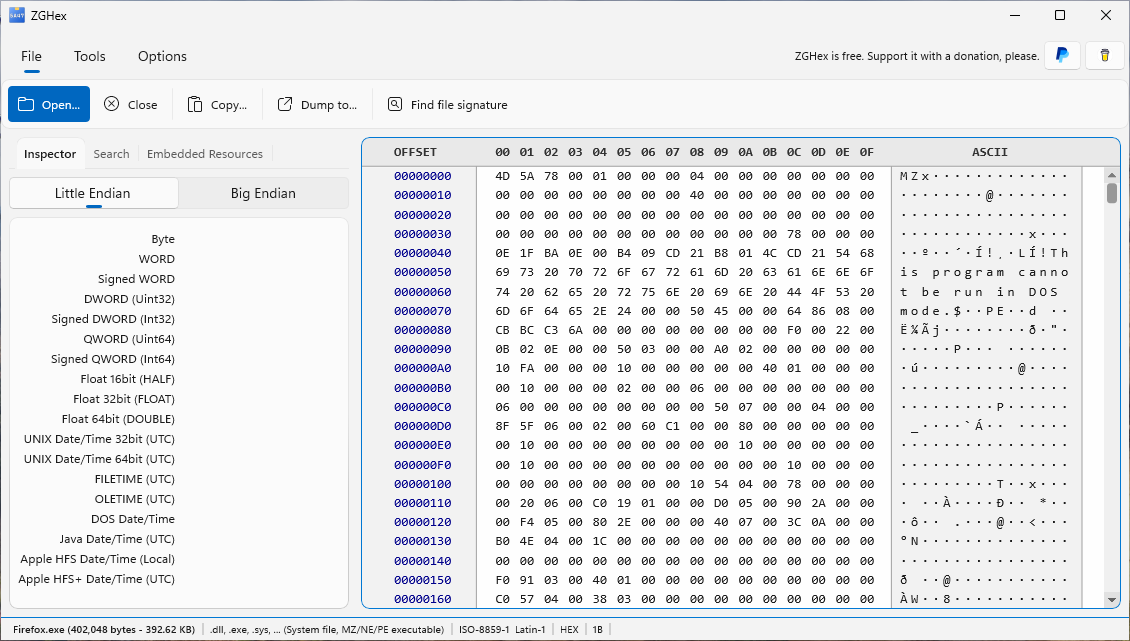
- Select a file. Its bytes appear in the hexadecimal view, with their text representation alongside.
You can also right-click a file in File Explorer and choose View with ZGHex when the Store package’s Explorer integration is installed. Windows may place this command under Show more options.
Read the workspace
The offset column shows byte positions from the beginning of the file. The hexadecimal columns show byte values; the ASCII area shows their text representation using the selected encoding. A dot can represent a non-printable character.
Use the left-hand tabs for Inspector, Search and, for supported files, Embedded Resources. The Tools tab provides analysis commands after opening a file.
A useful first experiment
Open an EXE or DLL, select its first two bytes and look for 4D 5A (MZ). Try the Inspector, then search for a word in the file. Choose File → Close when finished.