ZGHEX / HELP
Interpret bytes and dates
Read numbers, floating-point values and timestamps in both byte orders.
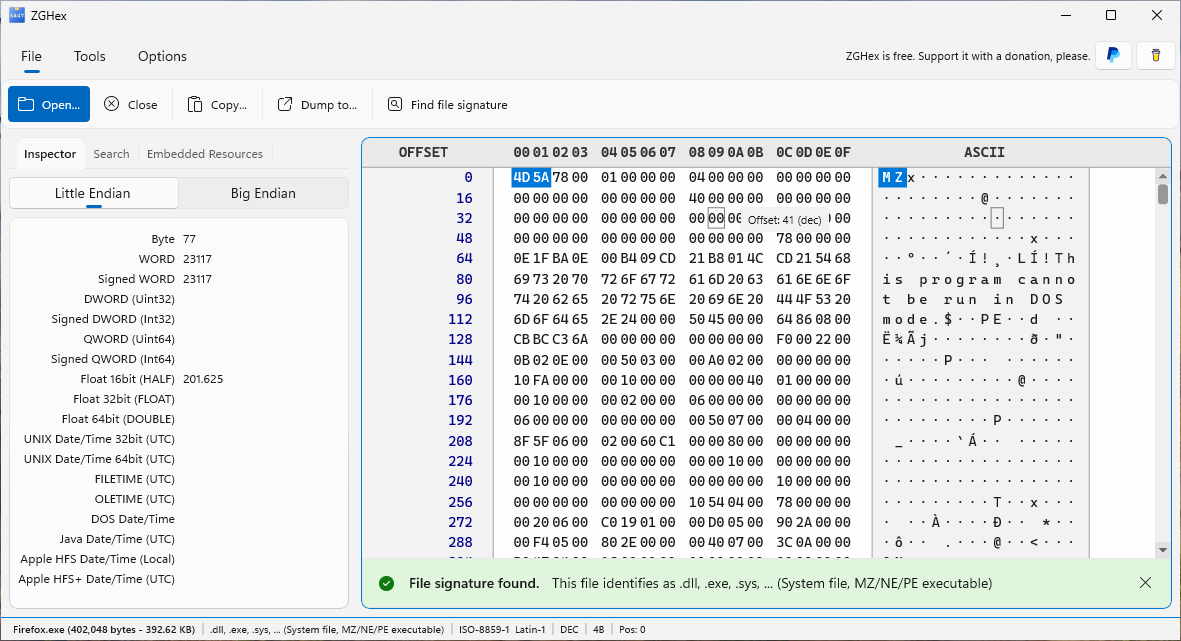
Select the bytes
- Open a file and select a range of bytes in the hexadecimal view.
- Open Inspector.
- Read the available interpretations: Byte, signed and unsigned WORD/DWORD/QWORD, Float 16/32/64 and date/time formats.
The interpretations use the beginning of the selected range. A 16-bit value requires at least 2 bytes, a 32-bit value 4 bytes and a 64-bit value 8 bytes. Fields remain empty when the selection is too short.
Choose byte order
Switch between Little Endian and Big Endian in the Inspector. For the bytes 01 00, the unsigned WORD is 1 in Little Endian and 256 in Big Endian. Choose the order specified by the format you are examining.
Understand timestamps
Available interpretations include UNIX 32/64, FILETIME, OLETIME, DOS, Java and Apple HFS/HFS+. Read the UTC or Local indication beside each field. An invalid date means the selected bytes cannot be represented in that format; a plausible date alone does not establish that the bytes contain a timestamp.